PhishNet | Hackthebox
An accounting team receives an urgent payment request from a known vendor. The email appears legitimate but contains a suspicious link and a .zip attachment hiding malware. Your task is to analyze the email headers, and uncover the attacker’s scheme.
Traslated
Un equipo de contabilidad recibe una solicitud de pago urgente de un proveedor conocido. El correo electrónico parece legítimo, pero contiene un enlace sospechoso y un archivo adjunto .zip que oculta malware. Su tarea es analizar los encabezados del correo electrónico y descubrir el plan del atacante.
ahora tenemos que analizarlo y dar una respuesta del incidente para que se apliquen las politicas necesarias y que la ip no se vuelva a comunicar con nuestra red.
TASK #1
What is the originating IP address of the sender?
Para responder la misma pregunta necesitamos ver el correo desde otra manera si nos encontramos en linux podemos verlo con el archivo y dandole un simple cat y ahi nos aparecera la estructura de lo que es el correo.
Press enter or click to view image in full size
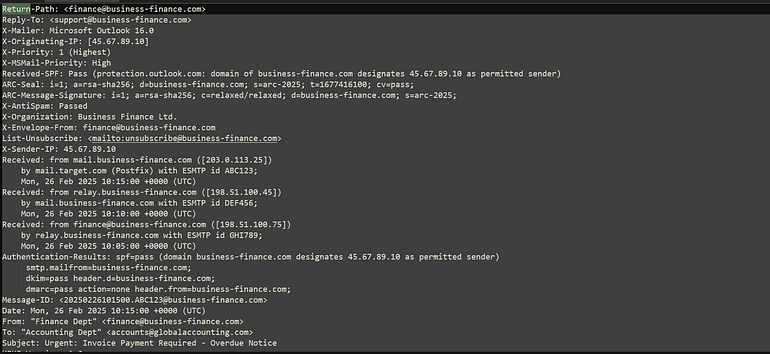
Cuando vemos la estructura del mismo ahora si podemos filtrar por los columnas en especifico para obtener toda la informacion necesaria y dar la respuesta.
Press enter or click to view image in full size

Recordando lo que quise decir con filtrar por la columna X-Originating, se puede conseguir la ip de donde se origino el correo.
Press enter or click to view image in full size

Task #2
Which mail server relayed this email before reaching the victim?
Siguiendo la misma logica a a partir de ahora solo filtraremos ya que tenemos conocimiento de lo que estamos buscando.
Press enter or click to view image in full size

aqui logramos obtener la siguiente respuesta.
Press enter or click to view image in full size

Task #3
What is the sender’s email address?
Para poder encontrar la respuesta de quien fue que el mando el correo tenemos que filtrar por lo siguiente X-Envelope-From ya que este contendra el valor que estamos buscando.

Press enter or click to view image in full size

Task #4
What is the ‘Reply-To’ email address specified in the email?
Una vez que conocemos como podemos filtrar de una manera mas facil nos damos cuenta que comprobrar si el correo es malicioso o no sera muy facil otra cosa cuando se deja un correo en reply es para que otra persona supuestamente el equipo de support de una empresa tenga conciencia de la accion que sucediendo en el momento y este puede intervenir.

Press enter or click to view image in full size

Task #5
What is the SPF (Sender Policy Framework) result for this email?
Primero que todo vamos a dar una definicion de que son estas siglas “SPF”
es un protocolo de autenticación de correo electrónico que previene la suplantación de identidad (spoofing) al permitir a los propietarios de dominios especificar qué servidores de correo tienen permiso para enviar correos en su nombre. Al publicar esta información en un registro TXT de su sistema de nombres de dominio (DNS), el servidor receptor puede verificar si la IP del remitente está autorizada, validando así la legitimidad del correo y evitando que los atacantes envíen mensajes maliciosos con la marca de su organización.
Press enter or click to view image in full size
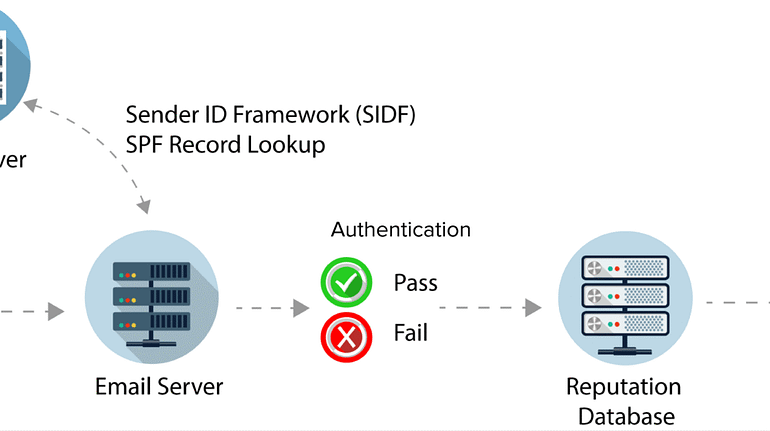
Despues de esto vamos a verificar si este paso o no.
Press enter or click to view image in full size

Una vez comprobado este si se paso el filtro.
Press enter or click to view image in full size

Task #6
What is the domain used in the phishing URL inside the email?
Press enter or click to view image in full size

Esto creo que se puede ver despues pero aqui le puedo dar una pequeña definicion de que es href
href (Hypertext Reference o Referencia de Hipertexto) es un atributo de HTML que define el destino de un enlace o hipervínculo, es decir, la URL a la que el navegador dirigirá al usuario cuando haga clic en un elemento de texto o imagen. Se utiliza principalmente con la etiqueta <a> para crear enlaces a otras páginas, secciones de la misma página o recursos externos.
Press enter or click to view image in full size

Task #7
What is the fake company name used in the email?
Se puede bucar en internet y las siglas nos llevan a este nombre.
Business Finance Ltd.
Press enter or click to view image in full size

Task #8
What is the name of the attachment included in the email?
se encuentra como attachment.
Press enter or click to view image in full size

Press enter or click to view image in full size

Task #9
What is the SHA-256 hash of the attachment?
SHA-256
8379C41239E9AF845B2AB6C27A7509AE8804D7D73E455C800A551B22BA25BB4A
Press enter or click to view image in full size

Task #10
What is the filename of the malicious file contained within the ZIP attachment?
Press enter or click to view image in full size

Ahora solo seria entrar al documento y en caso de que no lo dejen pueden ver eso.
Task #11
Which MITRE ATT&CK techniques are associated with this attack?
T1566.001
Phishing: Spearphishing Attachment
Adversaries may send spearphishing emails with a malicious attachment in an attempt to gain access to victim systems. Spearphishing attachment is a specific variant of spearphishing. Spearphishing attachment is different from other forms of spearphishing in that it employs the use of malware attached to an email. All forms of spearphishing are electronically delivered social engineering targeted at a specific individual, company, or industry. In this scenario, adversaries attach a file to the spearphishing email and usually rely upon User Execution to gain execution.[1] Spearphishing may also involve social engineering techniques, such as posing as a trusted source.
There are many options for the attachment such as Microsoft Office documents, executables, PDFs, or archived files. Upon opening the attachment (and potentially clicking past protections), the adversary’s payload exploits a vulnerability or directly executes on the user’s system. The text of the spearphishing email usually tries to give a plausible reason why the file should be opened, and may explain how to bypass system protections in order to do so. The email may also contain instructions on how to decrypt an attachment, such as a zip file password, in order to evade email boundary defenses. Adversaries frequently manipulate file extensions and icons in order to make attached executables appear to be document files, or files exploiting one application appear to be a file for a different one.
Press enter or click to view image in full size

Fin.