Shiba insider | Blue team labs
This challenge we need to response a cybersecurity incident, using different tools for get more information about it.
In my case, I’m goin to use tree:
Tools: cyberchef, wireshark, networkminer, exiftool.
The core of these tools are:
CyberChef: a “data transformation kitchen.” You paste/pipe in weird data (Base64, hex, URL-encoding, JWTs, logs, malware strings) and chain recipes to decode, deobfuscate, parse, and convert it into something readable. Core use: quick triage and decoding without writing scripts.
Wireshark: the packet microscope. It captures or opens PCAPs and lets you inspect traffic down to individual fields (TCP handshakes, HTTP, DNS, TLS, SMB, etc.). Core use: network troubleshooting + incident investigation by seeing exactly what was sent on the wire.
NetworkMiner: a PCAP artifact extractor (forensics-focused). Instead of deep protocol analysis, it “carves” and organizes hosts, sessions, files, images, credentials (when available), DNS, user agents from PCAPs in a friendly GUI. Core use: fast “what happened / what files were transferred” from a capture.
ExifTool: a metadata scalpel. Reads (and can write) metadata from tons of file types (images, PDFs, Office docs, media). Core use: extract timestamps, device/software info, GPS (if present), author/app details, and detect inconsistencies/tampering clues.
Tools recommended for the exercise:
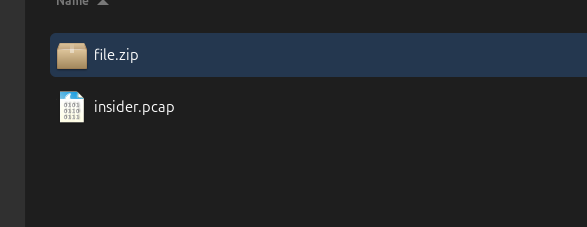
If you dowland the exercise’s file, There are a pcap and zip file, for unzip the you need to find the password in pcap file.
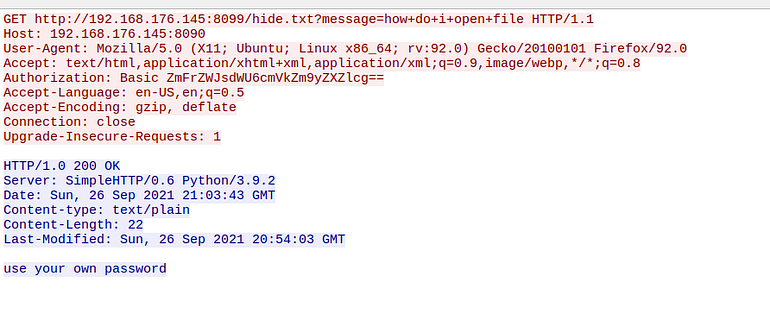
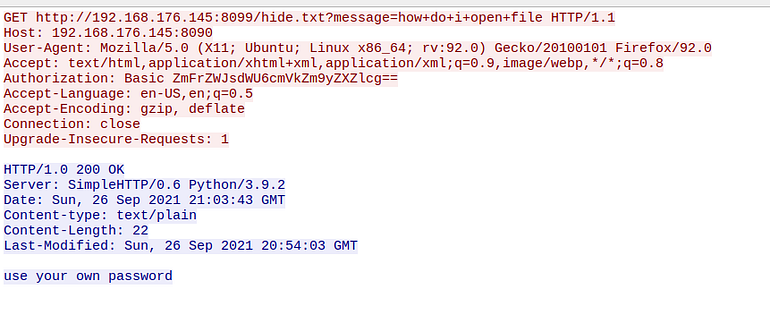
In the pcap file you will to see little network traffic but you will found 2 gold network packet. 1 A get traffic for http protocol and its response with 200 of estatus.
What is Get in http protocol?
GET is an HTTP request method used by a client (like a browser or app) to retrieve (fetch) a resource from a server.
Example:
GET /index.html HTTP/1.1
Host: example.com
What it means:
- “Server, please send me the content located at
/index.html
Press enter or click to view image in full size

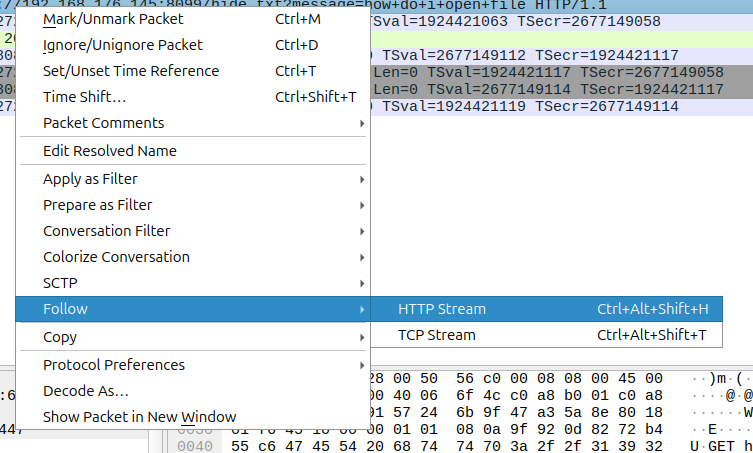
For get more information about the network packet you need do to click right and select follow http stream or TCP stream.
Press enter or click to view image in full size
Press enter or click to view image in full size
T
The password was encoded :
Authorization: Basic ZmFrZWJsdWU6cmVkZm9yZXZlcg==
For decode you can use cyberchef and I going to Teach you how you can do it .
To detect what kind of encoding/obfuscation/encryption a blob uses (Base64, hex, XOR, gzip, etc.), you basically combine pattern clues + quick tests.
1) Fast visual clues (most reliable)
Base64
Characters mostly:
A–Z a–z 0–9 + /(or- _for URL-safe)Often ends with padding:
=or==Length usually multiple of 4
Quick test: try decode; if it cleanly decodes and output looks structured (ASCII/JSON/PE header), it’s Base64.
Hex
Only
0–9 a–f A–FOften even length
Quick test: hex-decode and see if output becomes readable.
URL encoding
- Lots of
%2F %3D %3Aetc.
Quick test: URL-decode.
Gzip / zlib / compressed
Output looks like random bytes (high entropy)
Magic bytes:
gzip:
1F 8Bzip:
50 4B 03 04pdf:
%PDFexe:
MZ
Quick test: “decompress” after decoding hex/base64.
XOR (single-byte XOR)
Text looks random, but after XOR it becomes readable
Often found in malware strings/configs
Clue: repeated patterns, same-length ciphertexts, weird but consistent byte distribution.
Cyberchef
To detect what kind of encoding/obfuscation/encryption a blob uses (Base64, hex, XOR, gzip, etc.), you basically combine pattern clues + quick tests.
1) Fast visual clues (most reliable)
Base64
Characters mostly: A–Z a–z 0–9 + / (or — _ for URL-safe)
Often ends with padding: = or ==
Length usually multiple of 4
Quick test: try decode; if it cleanly decodes and output looks structured (ASCII/JSON/PE header), it’s Base64.
Hex
Only 0–9 a–f A–F
Often even length
Quick test: hex-decode and see if output becomes readable.
URL encoding
Lots of %2F %3D %3A etc.
Quick test: URL-decode.
Gzip / zlib / compressed
Output looks like random bytes (high entropy)
Magic bytes:
gzip: 1F 8B
zip: 50 4B 03 04
pdf: %PDF
exe: MZ
Quick test: “decompress” after decoding hex/base64.
XOR (single-byte XOR)
Text looks random, but after XOR it becomes readable
Often found in malware strings/configs
Clue: repeated patterns, same-length ciphertexts, weird but consistent byte distribution.
Cyberchef
Press enter or click to view image in full size
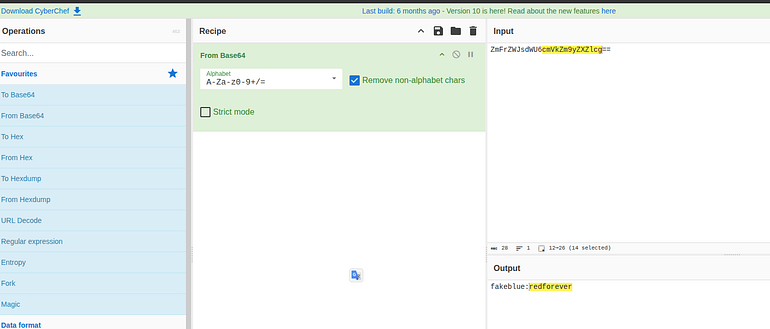
The firth one you need to researh on operations module and get “From base64” or you Or the cryptographic method you identified after put the method in recipe. Afterwards you have to put the encoded text in input.
Answers
What is the response message obtained from the PCAP file? (1 points)
use your own password
Press enter or click to view image in full size
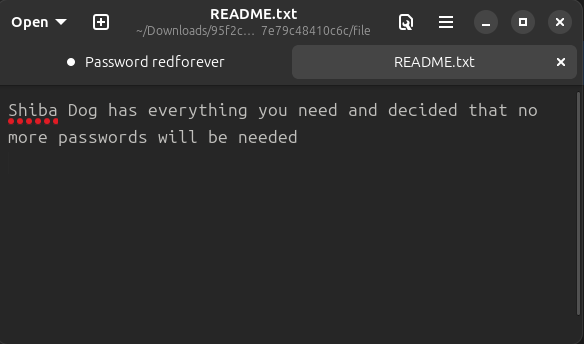
What is the password of the ZIP file? (1 points)
redforever
Will more passwords be required? (1 points)
NO
What is the name of a widely-used tool that can be used to obtain file information? (1 points)
Exiftool
Press enter or click to view image in full size
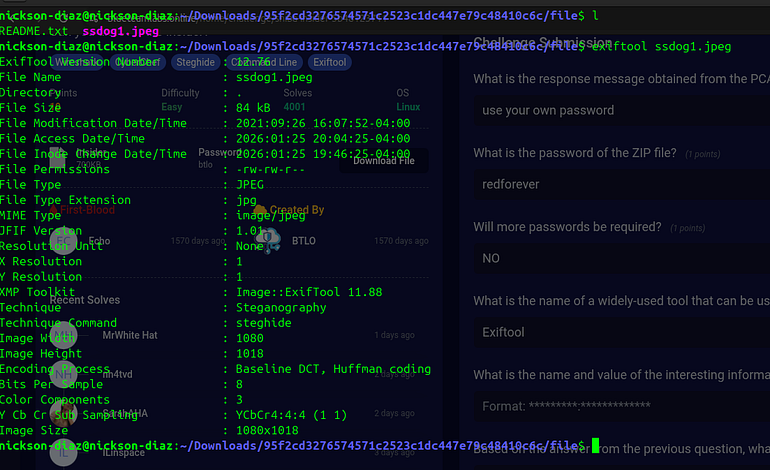
In this picture you can see the metadata of the it exercise picture, once we get the Technique : Steganography Technique Command : steghide you can use the same tool for stract the information.
What is the name and value of the interesting information obtained from the image file metadata? (1 points)
Technique : Steganography
Based on the answer from the previous question, what tool needs to be used to retrieve the information hidden in the file? (1 points)
steghide
steghide
Steghide is an open-source command-line steganography tool used to hide data (such as text files or images) inside image (JPG, BMP) or audio (WAV, AU) files without visibly altering the “cover” file. It provides secure, password-protected encryption (e.g., Blowfish) and is commonly used in digital forensics and covert communications to conceal information.
How to install
Sudo apt install steghide
How to extract hidden information (to get the ID)

Information from steghide ssdog1.jpeg

Then try extracting:

extract steghide -sf ssdog1.jpeg
Press enter or click to view image in full size
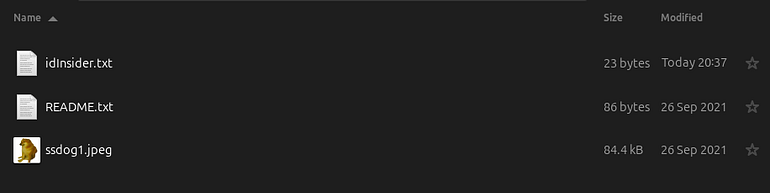
Enter the ID retrieved. (1 points)
0726ba878ea47de571777a
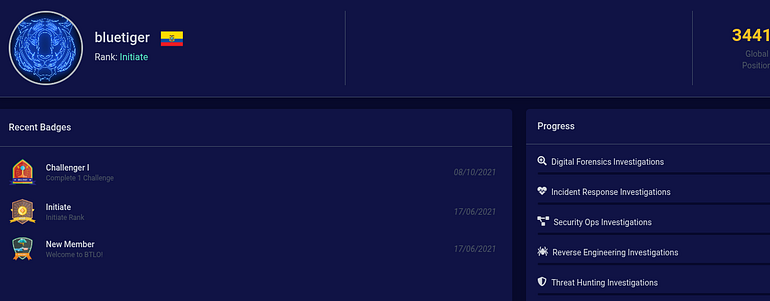
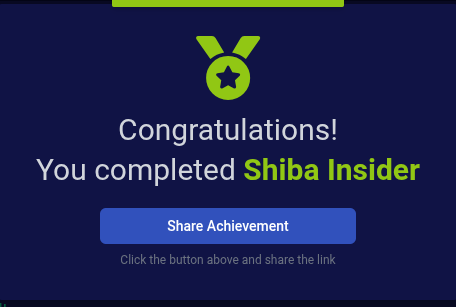
What is the profile name of the attacker? (3 points)
bluetiger
Press enter or click to view image in full size

Press enter or click to view image in full size
End